Projects/Preapproval
Pre-Approval Flow redesign
Simplifying a security-critical flow used daily by hundreds of thousands of residents across India
OVERVIEW
Role
Product Designer (Sole designer)
Duration
3 months
Company
NoBrokerHood
Responsibilities
Information Architecture, Visual Design, Handoff
What is pre-approval?
Getting a delivery in. Letting a cab through. Inviting guests for a party. These are mundane, everyday moments, but in a gated society, each one requires a resident to pre-approve entry in advance.
NoBrokerHood is a visitor management platform used by residents across 15,000 gated societies in India. Pre-approval is the feature that lets residents allow specific visitors entry to their society before they arrive, so the guard can let them through without interrupting the resident.
OUTCOME
The Final Design
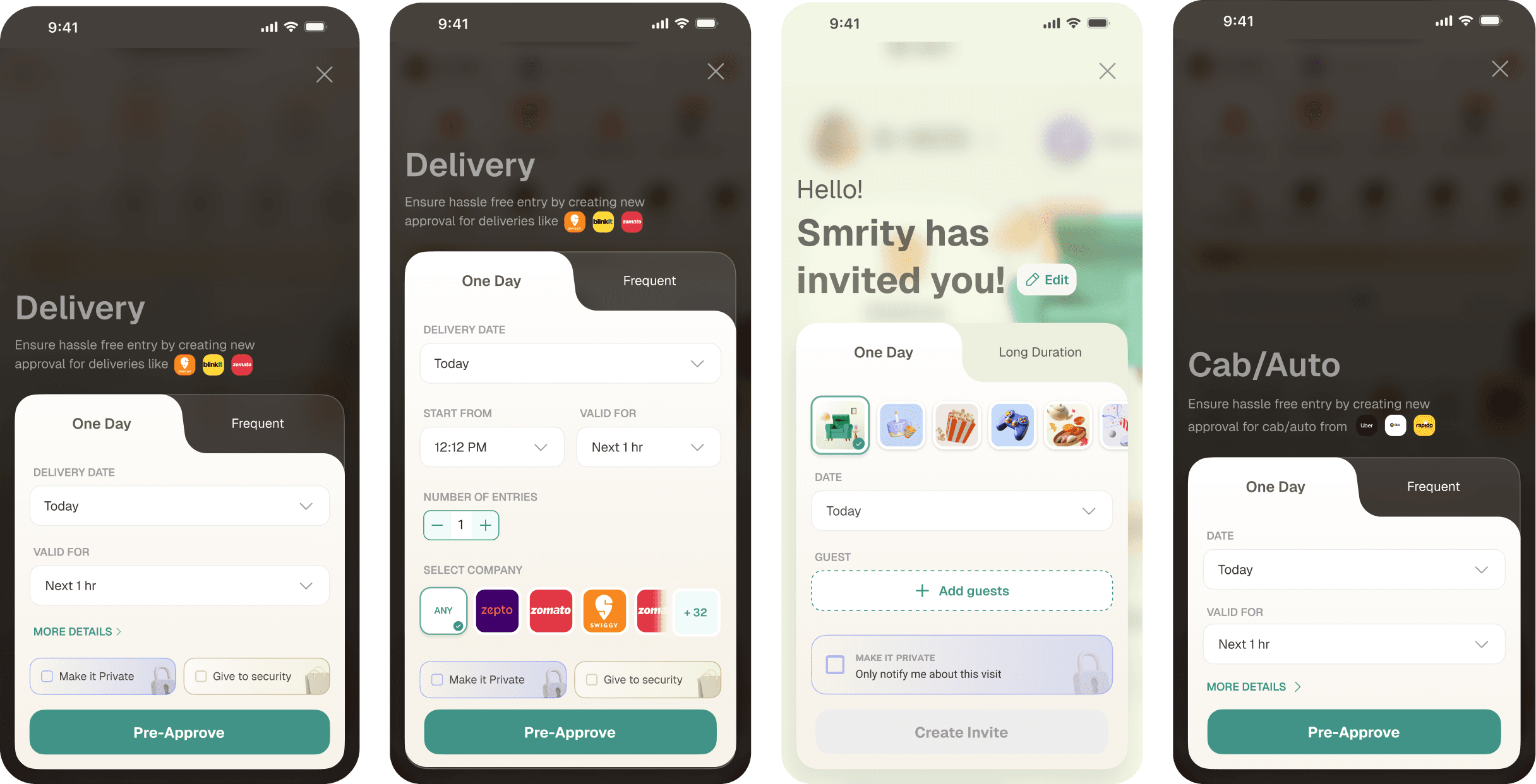
The shipped design covers edge cases — live group invites, pre-approved entries, partially picked-up packages — and is now live in 200 societies.
The Process
Why Redesign
The pre-approval feature had been running largely unchanged since 2018. Over time, it had accumulated options, edge cases, and flows that made a simple task feel heavier than it needed to.
Three things made a redesign the right call in 2024:
A competitor had launched a noticeably simpler version of the same flow, raising user expectations
We were introducing new features - group invites, multiple entries in a single day that couldn't fit cleanly into the old design
The UI was visually out of step with the rest of the app, which had been modernised
The goal wasn't just to refresh the visuals. It was to make pre-approvals fast and intuitive enough that residents would use them proactively.
Before I started: what had already been tried
Before I took on this redesign, other designers on the team had explored directions for modernising the pre-approval flow. These explorations were thoughtful and visually ambitious, but stakeholders felt they added visual complexity at a point where the brief was to simplify.
Looking at those explorations was one of the most useful inputs I had going in. The feedback from stakeholders was consistent: make it simpler, not just different.
Finding a visual direction
For the visual language, I didn't have a design system to pull from. The app was mid-overhaul; we were modernising flows one at a time, without a unified system in place yet. In that context, the most sensible anchor was the approval screen, which had just shipped and lived in the same 'gate management' universe as pre-approval.
Simplifying the Navigation Menu
These two were the additional features that were included in the pre-approval menu while not havin anything to do with pre-approval. These items were only present there to improve discovery of these features when they had been rolled out and were never revisited. This increased the number of options, adding cognitive load and visual noise

The old form displayed every possible option upfront: company name, collect at gate, surprise delivery.
Looking at usage, most users never touched these fields. Security collected company information at the gate regardless. "Collect at gate" was a niche case that didn't need to be a first-class field.
I moved these into a "More details" expandable section, surfaced only for users who want them. The primary form became: date, time window, number of entries, company. That's it.
The principle I was applying: don't make users dismiss things they don't need. Default to simple; let complexity be opt-in.

Multiple Entries
This one took a wrong turn before landing right.
The old design used a stepper with a limit of 10 entries per approval. It worked, but felt laborious if a user wanted to allow, say, 8 entries. My first instinct was to simplify: replace the stepper with a grouped button that defaulted to 10, removing the need to specify a number at all.
The stakeholders hated it and for good reason. Pre-approval is a security feature. Taking away explicit control over how many times a visitor can enter a building felt like a step too far, even if the default was sensible.
We reverted to the stepper.
The lesson: in security-adjacent flows, perceived control matters as much as actual efficiency. Don't optimise away the thing that makes users feel safe.

One Day vs Frequent - separating the two modes
I re-tested the cards by asking participants to find a detail hidden in the expanded view. Three things broke:

Group invite
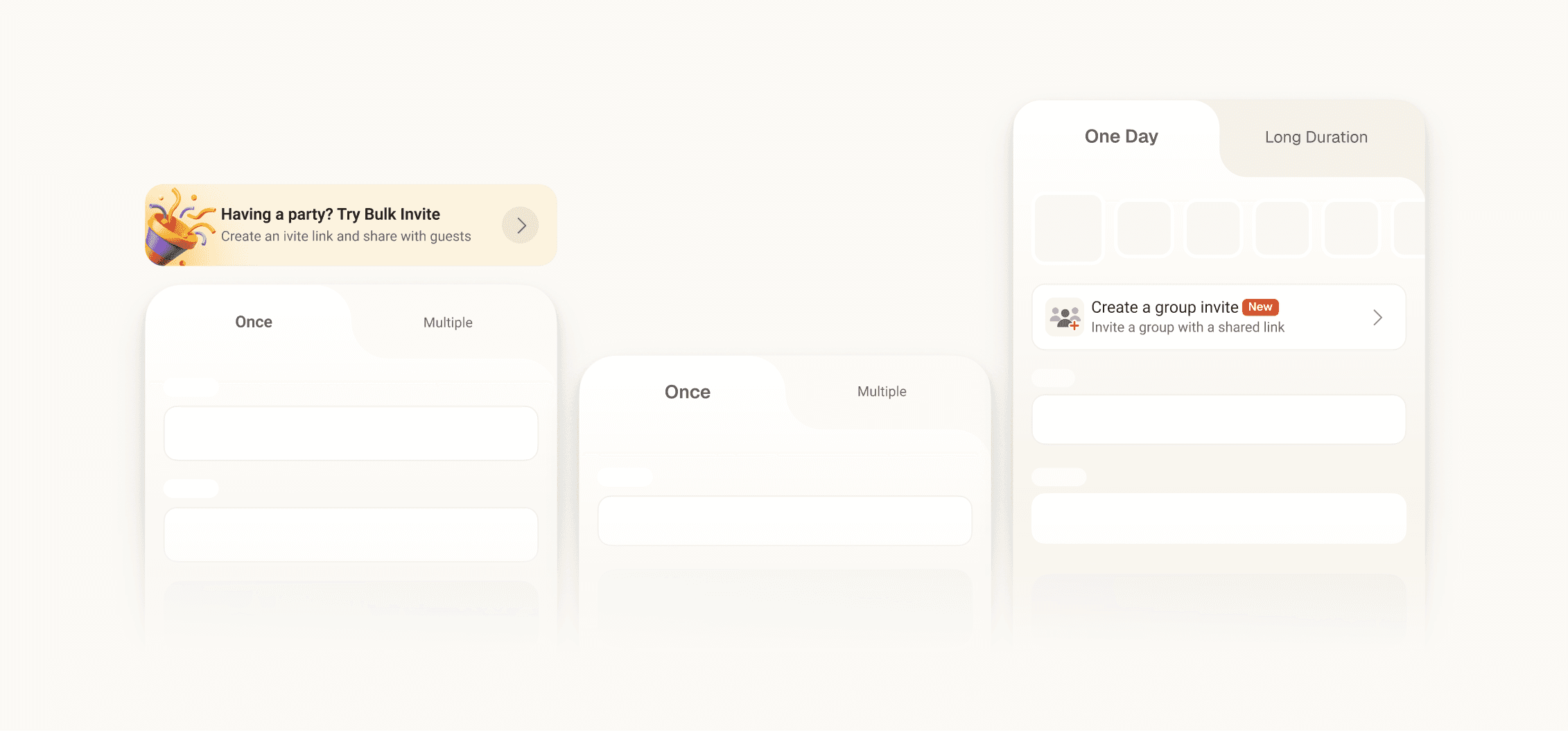
A bulk invite is a feature only made for guests, so once the guest mode is selected, a switch is displayed on the screen to switch to the bulk flow
Adding delight at the end
Inviting a guest can be for any occasion - a birthday, a housewarming, a festival. Once the functional problems were solved, I added themed visual treatments to the invite screen. Following the Peak-End Rule, making the final moment of the flow feel special improves how the overall experience is remembered — even if the steps before it were neutral.
DESIGN DETAILS
Introducing guest invite feature
We rolled out this feature in a few societies and observed how users were interacting with this feature. What we say was ~60% of the invites created were empty. After a few interviews, and scanning app reviews, we found that users were not distinguishing between the group invite link and a normal guest invite flow. I placed the group invite feature in the pre-approval menu and separated the two flows completely to help this issue
The correct way to see your invite
When users create a normal guest invite, they see a QR code and share it with the guest. In this flow though, the QR code is generated by the guest themselves. What should the user see then? Instead of an empty state for the QR code, I decided to go with an emphasis on the next action that is - share invite.

Closing reflection
I'd push harder for even lightweight research before committing to direction.
Most of my decisions were intuition-led and turned out well, but the stepper incident is a reminder that assumptions about user priorities — especially around security — can be wrong in ways that aren't obvious. Even three or four user sessions early on would have caught that faster.
I'd instrument the flow more carefully before launch.
The 33% figure is meaningful, but I can't cleanly attribute it to any single change. More granular funnel tracking — drop-off at each step, completion rates per category — would have made the post-launch story much sharper and helped prioritise the next iteration.
The group invite discovery problem isn't fully solved.
Separating the flows reduced empty invites, but I don't have data on whether users are finding the group invite feature easily in its new location. That's a loose end I plan to chase
